Webland AP Gov In Login – Land Services of Andhra Pradesh
Webland AP is an online land records system developed by the Government of Andhra Pradesh. It is mainly used by authorised revenue officials to manage and verify land records, survey details, and property information. The platform also works together with Bhu Naksha AP services to help users access cadastral maps and land parcel information online.
Normal citizens usually cannot use the Webland AP login directly. If you want to check 1-B, Adangal, Passbook, FMB, or Village Map, you should use the Meebhoomi AP portal.
What Is Webland AP?
This is a digital system for managing land records in Andhra Pradesh. It helps the government keep land details in one central database. This can reduce fake records, improve transparency, and make land record verification easier.
In simple words, Webland AP is used for official land record work, while Meebhoomi AP is used by citizens to check land details online.
Portal Details
| Detail | Information |
| Portal Name | Webland AP |
| State | Andhra Pradesh |
| Launched By | Government of Andhra Pradesh |
| Managed By | CCLA, Vijayawada |
| Official Website | webland.ap.gov.in |
| Main Users | Authorised government/revenue officials |
| Citizen Portal | Meebhoomi AP |
Who Can Use Webland AP Login?
This login is mainly for authorised users like revenue officers and government staff. These users can log in to verify, approve, and manage land record requests.
If you are a landowner, farmer, or property buyer, you do not usually need Webland login. You can check your land records through Meebhoomi AP.
Login Process
Follow these steps if you are an authorised user:
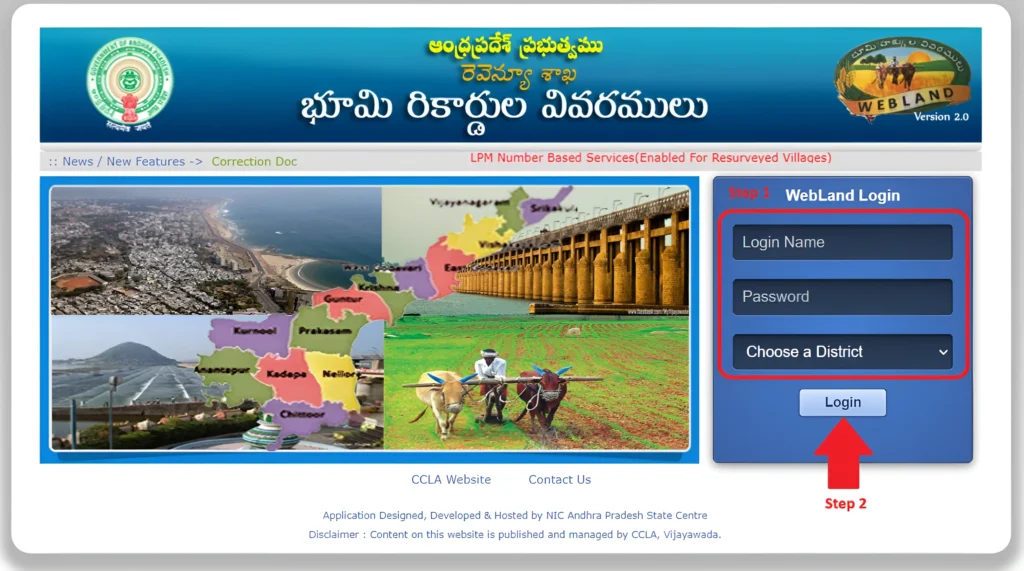
If the details are correct, the Webland dashboard will open.
Services Linked With Webland AP
This is connected with different land record services, such as:
For public access, these records are usually checked through Meebhoomi AP or MeeSeva.
How Citizens Can Check AP Land Records
Citizens can use Meebhoomi AP to check land records. You may need details like:
Through Meebhoomi AP, users can check 1-B, Adangal, passbook, FMB, and village map details.
Common Login Problems
Sometimes users may face login issues. Common reasons include:
If you are not an authorised user, you should use Meebhoomi AP instead of Webland AP.
Frequently Asked Questions
conclusion
This is an important digital system for managing land records in Andhra Pradesh. Through the Webland AP gov in login page, authorised users can access land record services by entering their login name, password, and district.
For normal landowners, farmers, and property buyers, Meebhoomi AP is usually the better option to check 1-B, Adangal, FMB, village map, and passbook details. If your record is missing or incorrect, visit MeeSeva or the local revenue office for proper help.