Bhu Naksha AP: Check Andhra Pradesh Cadastral Map and FMB Online
Do you want to check the land map / భూమి మ్యాప్ of your property in Andhra Pradesh? If yes, then Bhu Naksha AP can help you view your land parcel, survey number, and cadastral map online through Meebhoomi AP services. Users can also access land-related records and verification details using Web land AP Gov In Login for various revenue and property information online.
Many landowners, farmers, and property buyers in Andhra Pradesh use Bhu Naksha AP to check their survey number / సర్వే నంబర్, plot boundary, and village map details. For other land records like 1-B, Adangal, FMB, village maps, and passbook, you can also use the Meebhoomi AP portal.
What Is Bhu Naksha AP?
Bhu Naksha AP is a digital land map service for Andhra Pradesh. It helps users check the map of their land without visiting the revenue office again and again.
In simple words, it shows where your land is located on the official village map. If you know your survey number / సర్వే నంబర్, you can easily find your plot on the map.
It is useful for:
Details Needed to Check Bhu Naksha AP
Before using the portal, keep these details ready:
| Detail | Telugu Meaning |
| District | జిల్లా |
| Mandal / Zone | మండలం |
| Village | గ్రామం |
| Survey Number | సర్వే నంబర్ |
| Land Type | భూమి రకం |
Tip: If you do not know your survey number, first check your land documents, 1-B, Adangal, or passbook.
How to Check Bhu Naksha AP Cadastral Map Online
Follow these simple steps:
Step 1: Visit the Bhu Naksha AP Website
First, open the official Bhu Naksha AP portal in your browser. Always use the official government website for checking land map details.
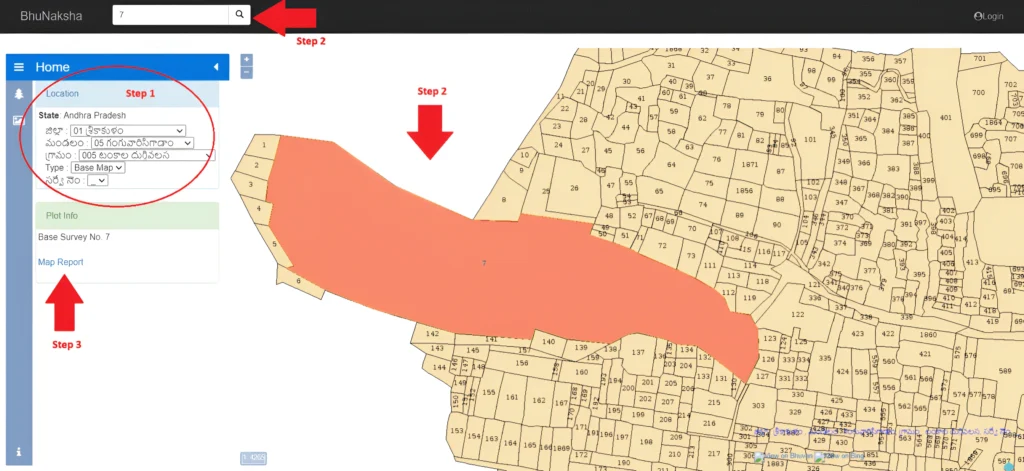
Step 2: Select Your Location Details
Now select your:
Make sure you select the correct details. If one detail is wrong, the map may show the wrong land parcel.
Step 3: View the Village Map
After entering the details, the village map will appear on your screen. You can zoom in and move the map to find your land.
Step 4: Click on Your Plot
Now click on your plot or search your survey number. Once you select the plot, the portal will show basic plot information.
Step 5: Open Map Report
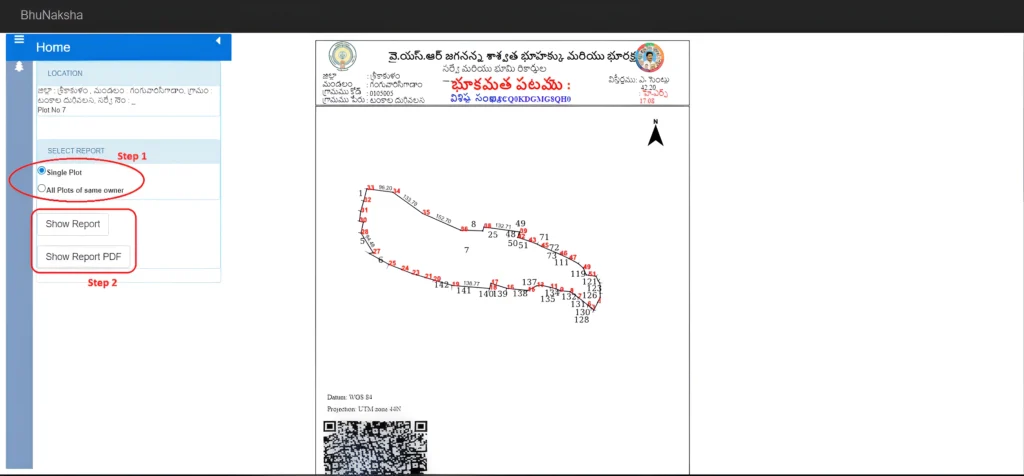
Click on the Map Report option. This will open the cadastral map or FMB-related map report.
Step 6: Download or Print the Report
Now select the report type, such as:
Then click on Show Report PDF. After that, you can download / డౌన్లోడ్ or print / ప్రింట్ the map report.
Frequently Asked Questions
conclusion
Bhu Naksha AP is a helpful online service for checking your land map / భూమి మ్యాప్ in Andhra Pradesh. By selecting your district / జిల్లా, mandal / మండలం, village / గ్రామం, and survey number / సర్వే నంబర్, you can view your plot, cadastral map, and FMB map report easily.
This service is useful for landowners, farmers, and property buyers who want to check land boundaries or verify property location. However, for legal work, land disputes, sale, registration, or boundary confirmation, always verify the details with the local revenue or survey office.